

A CRM can look full while still hiding follow-up risk. The goal is not to message every old contact. The goal is to identify which records deserve review, which records should be closed, and which ones need a clean next task.
Use this process when the team suspects the pipeline contains old opportunities but does not know where to begin.
Create a stale-record review
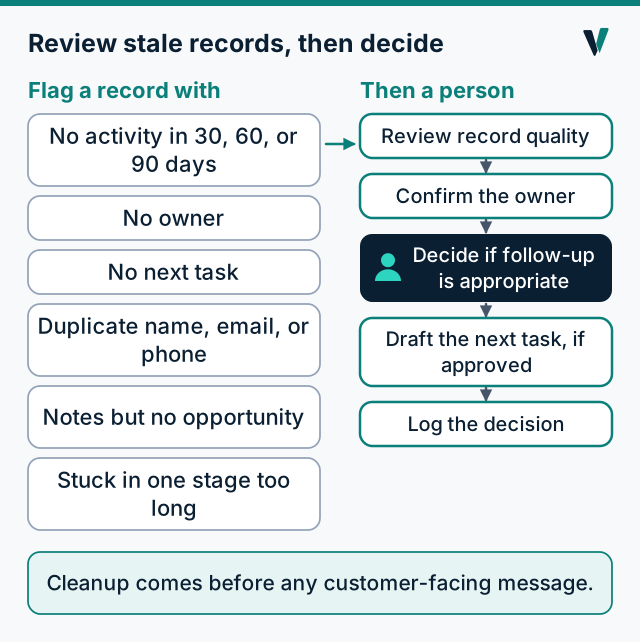
- Open opportunities with no activity in the last 30, 60, or 90 days.
- Leads with no owner.
- Contacts with notes but no opportunity.
- Deals with no next task.
- Records with duplicate names, emails, or phone numbers.
- Opportunities stuck in the same stage beyond the normal sales cycle.
Separate cleanup from outreach
CRM cleanup should happen before customer-facing communication. A safe workflow can identify a stale record, prepare a summary, and route it to a person.
- Review record quality.
- Confirm the owner.
- Decide whether follow-up is appropriate.
- Draft the next task if approved.
- Log the decision.
An example export to start from
You do not need special access to anyone's system to begin. Ask your CRM, or the person who looks after it, for a plain export (a spreadsheet or CSV) with these columns, and then filter it yourself.
- Columns: record name, company, email, phone, owner, stage, last activity date, next task date, estimate amount.
- Filter: stage is not won or lost, and last activity is older than your normal sales cycle (use 30, 60 and 90 days to see the shape of the pile).
- Sort: estimate amount, highest first, then oldest activity.
- Add four columns by hand: decision, reason, decided by, decided on.
Download the review sheet (CSV). It has the columns above and two clearly labelled example rows. It is a blank template, and it does not read or change anything in your CRM.
Watch for duplicate and split histories
Duplicates make good opportunities harder to understand. A person should review whether records represent the same contact, the same company, or different relationships. Here is an illustrative example, with invented names:
| Record | Phone | Last activity | What it holds | |
|---|---|---|---|---|
| R. Alvarez (record 1) | 555-0142 | ralvarez@example.invalid | March | An estimate sent, no follow-up |
| Rosa Alvarez (record 2) | 555-0142 | August | A call note: "wants a second quote" |
Same phone number, different spellings. Each record holds half the story: the estimate is in one and the customer's most recent request is in the other. Merging them, once a person confirms they are the same customer, keeps one history, so whoever follows up sees both. Two people calling the same customer because each saw one record is the outcome to avoid.
Recover, update or close: how to decide
Age is a reason to look at a record. It is not a reason to close it, and it is not permission to contact anyone.
| Decision | When it fits | What to record |
|---|---|---|
| Recover | There is a real reason to follow up (an open estimate, a stated future date) and a permitted way to reach them | The owner, the date, and the reason |
| Update | The record is incomplete or wrong (no owner, no stage, duplicate) | What changed and who confirmed it |
| Close | The customer decided, asked not to be contacted, or the record has no usable route or reason | Closed lost or closed, with the reason |
Approval points
Human approval matters when a record may trigger customer communication, status changes, or CRM updates that affect a rep or customer.
- Approve a revived opportunity.
- Reject a stale record.
- Assign or reassign the owner.
- Approve a follow-up draft.
- Approve any change to the CRM itself.
Nothing in this process assumes that anyone has access to your CRM or that changes are written back to it automatically. A person makes each change, or approves it first.
Next step
Use the CRM lead recovery page to see a worked example, or ask for the Free Lead Leak Check to start with a bounded written review.